




Set List Maker is a powerful organizational tool for musicians. With thousands of people around the world using the app in creative ways, the app is packed with features to manage your repertoire, control your on-stage electronics and share with your bandmates.
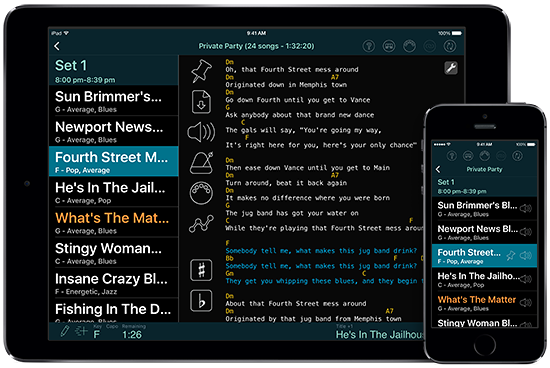
- More than a digital songbook: Set List Maker can store your lyrics and chord charts, but it can also keep track of your rehearsal notes and serves as an archive of all your set lists. You can include multiple reference recordings for each song, slow down or pitch-shift recordings while practicing,* transpose chords with one touch, and make a quick recording if inspiration strikes.* Then design your own screen layouts to show the most important information in each setting you play in.
- Your command center on stage: Set List Maker can display your lyrics with simple auto-scrolling or custom automation tracks,* play backing tracks and click tracks through separate audio ports or inter-app audio,* play videos,* and configure MIDI-compatible sound and lighting equipment as you move from song to song.* You can control Set List Maker with MIDI* or Bluetooth footswitches, and link together multiple devices for screen sharing or remote control on stage.*
- Keep your bandmates in the loop: Set List Maker can export databases and import them onto your bandmates' mobile devices so everyone has access to the latest songs, set lists, and details of upcoming shows. You can also email set lists in PDF or HTML format, or print good old paper set lists to keep it simple on stage.
The Set List Maker interface is available in English, German, Dutch, Danish, Swedish, Norwegian, French, Italian, Spanish, Portuguese and Czech. Documentation and tech support is only available in English.
Some advanced features (*) require an in-app purchase. You can click through the site for detailed tutorials and demo videos, or read some user reviews, before making your purchase decision.
You can run the Android app in Bluestacks on Windows computers, but this has limitations. More info
Pro tip: Before buying Set List Maker, check out its big brother, BandHelper.


