

There are lots of alarm clock apps out there, but I wrote My Music Alarm to solve a few specific problems that other apps didn't solve:
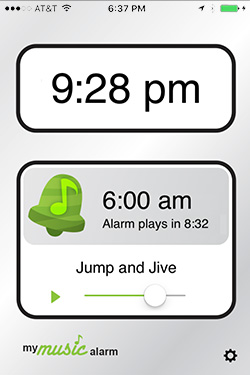
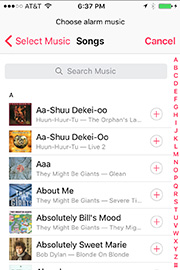
- Wake to your music: I wanted to wake up to a song selected from my music library. This app doesn't have built-in alarm sounds or playlist access, but it lets you quickly select any song from your library, and then plays that song in a loop until you wake up. (This functionality was added to the built-in Clock app after this app was written.)
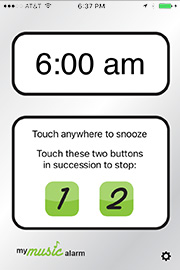
- Snooze/off control: I needed more distinction between the Snooze and Stop buttons when the alarm goes off. Most apps display two big buttons on the screen, so it's easy to turn the alarm off before you're really awake. This app makes the whole screen a Snooze button (easy to press) and makes the Stop button a two-step process (hard to press accidentally).
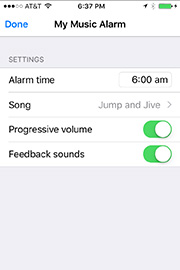
- Progressive volume: The volume of the songs on my iPod varies, and the background noise around my house also varies, so other alarms sometimes don't play loudly enough to wake me up. This app includes a volume test button right on the main screen, to compensate for different song volumes, and an option to increase the alarm volume every minute, in case the background noise in the house is louder when I wake up than it is when I go to bed.
I also added a few features for convenience:
- Fast time entry: You can enter your alarm time by typing in a number, which is usually faster than the scrolling wheel that other alarm clocks use.
- Short snooze: When your alarm is playing, you can tap the screen for a normal 9-minute snooze, or double-tap it for a 3-minute "short snooze" -- perfect for those mornings when you need to get every bit of sleep you can!
- 24-hour time: If your device is set to use 24-hour time, this app will automatically operate in 24-hour mode as well.
However, I also tried to keep the app simple, without a lot of extra features that make it difficult to navigate. So, please send any feedback using the link above, but keep in mind that the app will probably remain focused on the main features listed above.
Please read before using
- If you plug in your device and leave it running, you'll see the snooze and stop controls when the alarm goes off. If you switch to another app, lock your device or let it auto-lock, you'll hear the alarm, but you'll have to unlock your device and open the app before you see the snooze and stop controls. Once the alarm has gone off, your device won't auto-lock while it is snoozing.
- If your device is not plugged into a power source, My Music Alarm will use more battery power than normal when an alarm is set. Please be sure your battery is adequately charged if you are not able to plug it in while you sleep.


